

Markov Models in TreeAge Pro
Build Visually
- Build your Markov model visually with TreeAge Pro’s Markov Model Wizard and Visual Editor.
- Add inputs where they apply within the model structure
Analyze with Confidence
- Model calculations follow the health states, pathways, and inputs you define.
- Explore and validate disease progression with integrated reporting and visualization tools.
- Analyze costs, effectiveness, uncertainty, and other health economic outcomes with integrated analysis tools.
Communicate Clearly
- Communicate your model, assumptions, and results clearly with visual model structure and integrated reporting.
Build Your Markov Model Structure
Health States and Event Pathways
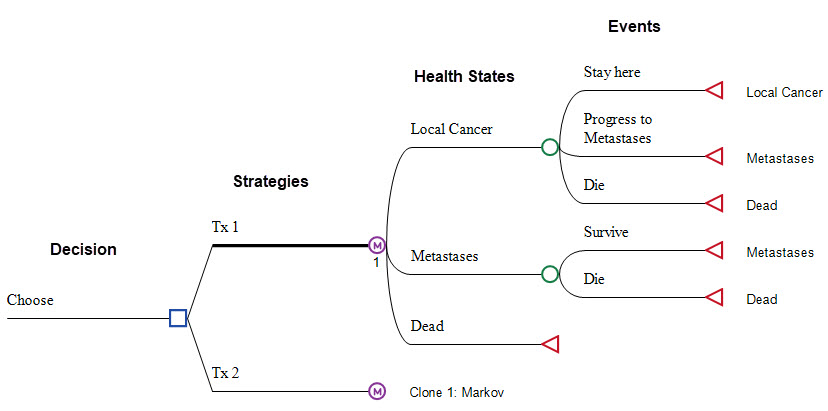
Build health states and event pathways directly in the visual model editor.
Use the Markov Model Building Wizard to define the main structure of your Markov model.
Add Inputs Where They Apply
Add Event Probabilities
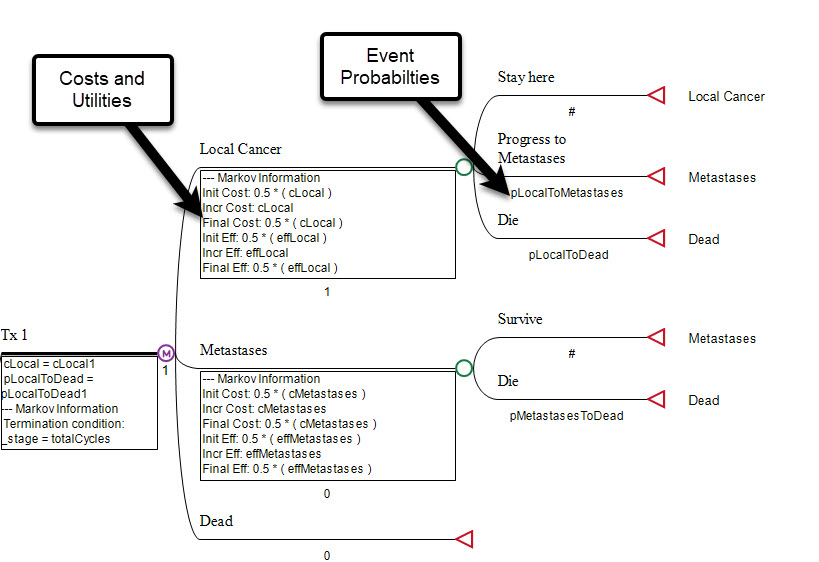
Add event and transition probabilities directly to the model to define how patients move between health states over time
Use hazard functions to represent how event risk changes over time.
Use Patient Simulation when patient characteristics and history influence disease progression and outcomes.
Add Costs and Utilities
Add costs and utilities to health states and events so economic outcomes and health-related quality of life follow the patient pathways represented in the model.
Track additional clinical and model outcomes, such as progressions, deaths, screenings, and procedures, as patients move through the model.
Analyze Your Markov Model with Built-In Tools
Markov Model Calculations & Reporting
Model calculations follow the health states, events, probabilities, costs, and utilities you define within the model structure. Results include costs, effectiveness, and other outcomes used in cost-effectiveness analysis.
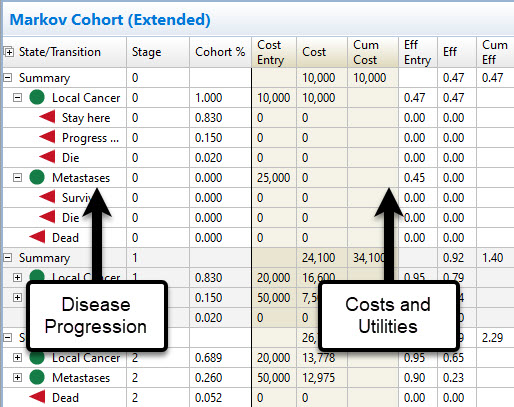
Markov Cohort Reports provide cycle-by-cycle details on disease progression, health-state membership, costs, utilities, and other outcomes.
Built-in functions support half-cycle correction and discounting within the Markov process.
Markov Plot
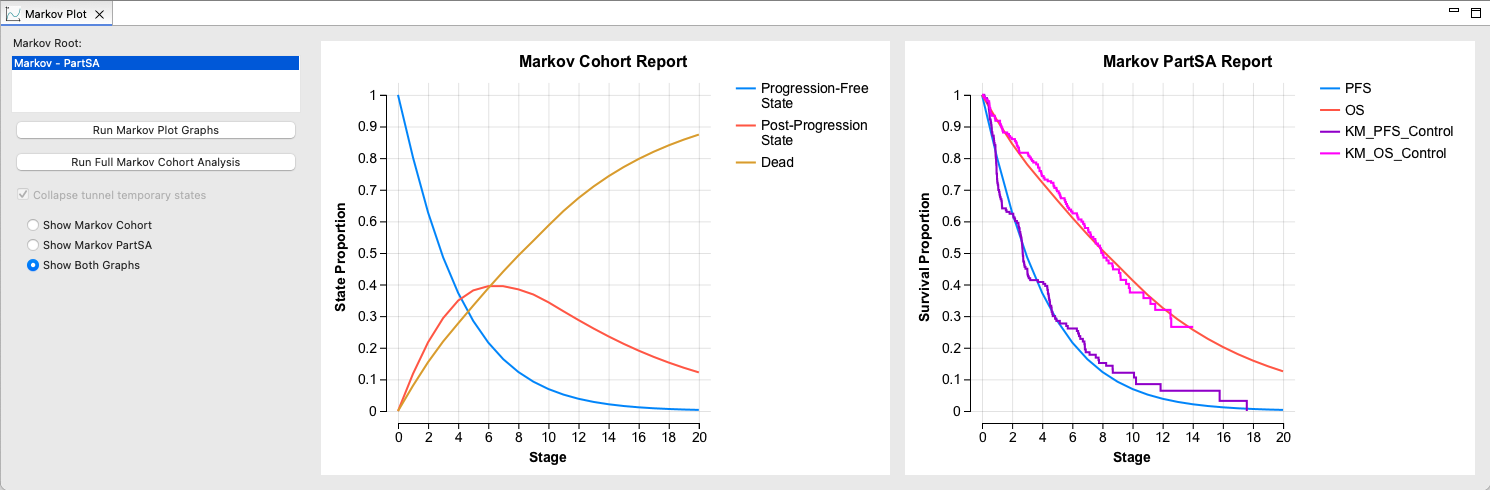
Use the Markov Plot to compare disease progression in your model with clinical Kaplan-Meier survival curves.
Refine model assumptions and compare updated model behavior with the clinical evidence.
Extend Your Markov Analysis
Use integrated health economic analysis tools to explore results and uncertainty within your Markov model.
- Cost-Effectiveness Analysis to compare strategies using costs and effectiveness
- Sensitivity Analysis/Tornado Diagrams to assess parameter uncertainty and identify the parameters that have the greatest impact on results
- Probabilistic Sensitivity Analysis (PSA) to assess uncertainty across multiple parameters
- Patient Simulation to explore patient-level variation, characteristics, and history
Communicate and Share Your Model
Make your Markov model and results easier for colleagues, clients, and reviewers to explore and understand.
- Markov to Excel Conversion – Export Markov models to working Excel models for review and further analysis
- Share Models on the Web – Let others examine the model, change inputs, and run analyses without installing TreeAge Pro.
State Transition Diagrams
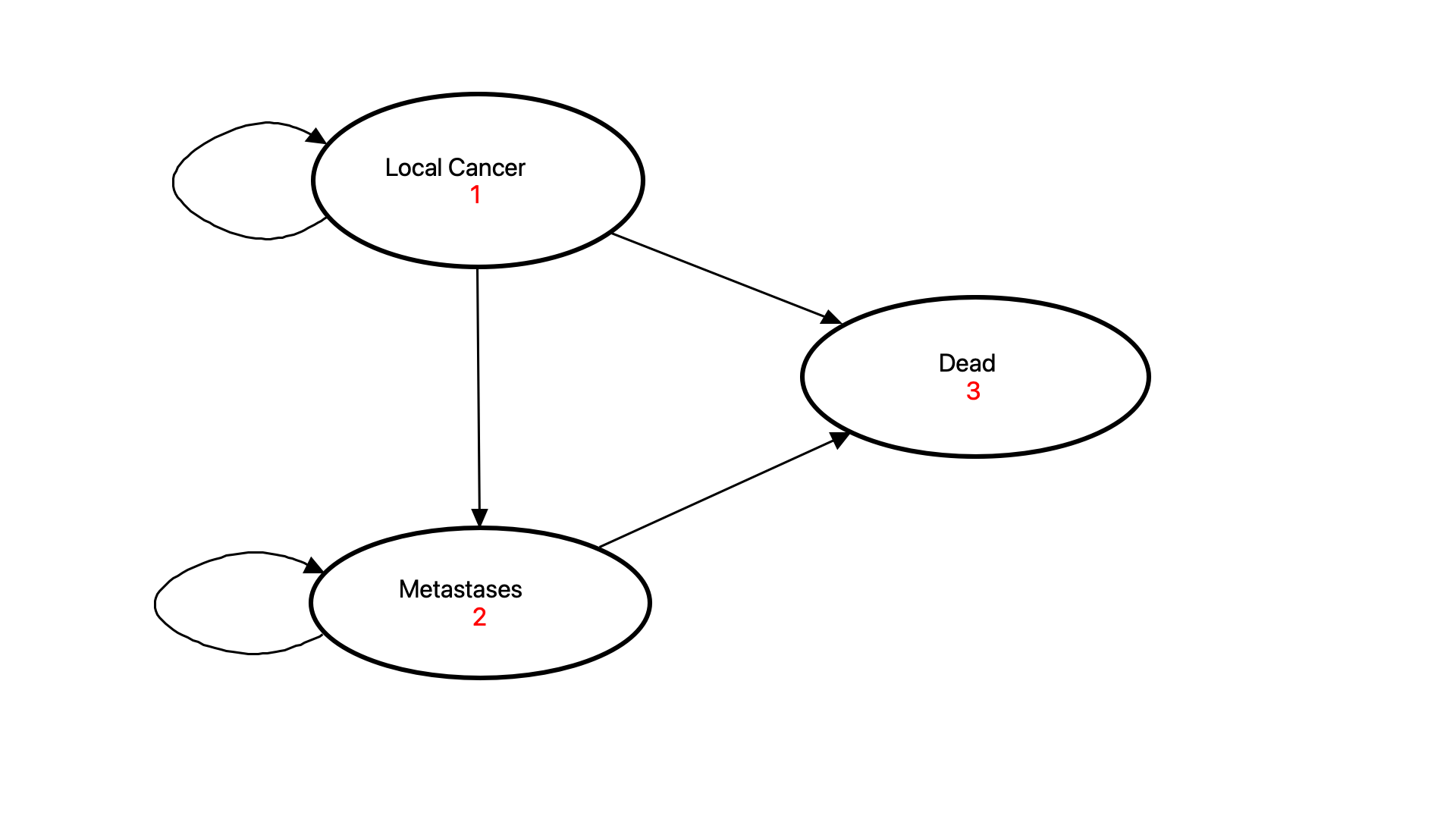
Convert your Markov model to a State Transition Diagram to provide a simplified visual representation of health states and transitions for presentations, reports, and publications.
Start with a State Transition Diagram to establish the flows among states, then convert it to the tree format to add inputs and complexity.
Learn More About Markov Modeling in TreeAge Pro
Markov Model Webinar
See how to build, analyze, and explore Markov models in TreeAge Pro using the visual modeling framework and integrated analysis and reporting tools.
Build a Markov Model Visually
Analyze a Markov Model
What Is a Markov Model and Why Is It Used in Health Economics?
Markov models, also known as state transition models, represent disease progression over time using a defined set of health states and transitions between them.
For example, a cancer model might include health states such as progression-free disease, progressed disease, and death. During each model cycle, patients can remain in their current health state or transition to another state based on defined probabilities. Repeating this process over time represents how the patient population progresses through the model.
As patients move through the model, costs, utilities, and other outcomes can be associated with health states and events. This allows the model to accumulate clinical and economic outcomes over the selected time horizon.
Markov cohort analysis tracks the proportion of the patient cohort in each health state over time and calculates the resulting costs, effectiveness, and other outcomes. These results can then be used to compare alternative strategies through cost-effectiveness and other health economic analyses.